// Sensors
Rig file reference
Every field of a simforge.render-rig/v1 sensor rig, with its type, range, default and units, and what the renderer supports on top.
A rig is one JSON object. Unknown fields are refused everywhere, so a typo fails simforge rig validate instead of being ignored. The JSON Schema is /docs/render-rig.schema.json, and the CLI checks exactly the same rules.
The file#
| Field | Type | Required | What |
|---|---|---|---|
schema | string | yes | Always simforge.render-rig/v1 |
sources | array of 1 to 64 sources | yes | The cameras, lidars and radars |
clip | object | no | {startSeconds, endSeconds}: render only this part of the scenario, [start, end) in seconds from the scenario's start. Default: the whole scenario (warning render_clip_whole_timeline) |
video | object | only with a radar | {width, height, fps, container, codec, quality}. The renderer uses fps as the radar sample rate; container must be mp4, codec h264, and quality one of draft, standard, high (lossless is refused). Each video takes its size from the cameras |
sensorHosts | array | no | Which vehicle carries each source: {sourceId, actorId, vehicleAsset: {catalogAssetId}}. Leave it out: every source is then carried by the scenario's ego |
Every source#
| Field | Type | Required | What |
|---|---|---|---|
actorId | string | yes | The vehicle that carries it. Any value works: a render mounts every source on the scenario's ego. Use ego |
sensorId | string | yes | Your name for the sensor |
sensorLabel | string, 1 to 200 characters | no | A human-readable name, shown by rig show and in Studio |
outputName | string | yes | The sensor's folder and file prefix in the output: a letter or digit, then up to 63 letters, digits, - or _. Unique in the rig |
modality | string | yes | rgb for a camera, lidar, or radar |
transform.position | {x, y, z}, metres | yes | The mount in the vehicle frame: x forward, y up, z left, from the box centre at ground level |
transform.rotation | {yawRad, pitchRad, rollRad}, radians | no | Each 0 by default. Rotations: yaw left-positive in -pi to pi, pitch nose-up in -pi/2 to pi/2, roll right-side-down in -pi to pi |
mountFrame | body or gimbal | no, cameras only | gimbal follows a drone's stabilized gimbal; default body |
attributes | object | yes | By modality, below |
Two sources may not share an outputName, or the same actorId, sensorId and modality.
Camera (modality: rgb)#
| Attribute | Type | Range | What |
|---|---|---|---|
width | integer, pixels | 64 to 8192 (the renderer draws at most 4096) | Image width |
height | integer, pixels | 64 to 8192 (the renderer draws at most 4096) | Image height |
fps | number, frames per second | above 0, up to 240 | Frame rate |
horizontalFovDeg | number, degrees | above 0, up to 180 | Pinhole camera: the horizontal field of view. The vertical field follows from the aspect ratio |
cameraModel | object | Lens camera: an f-theta lens (below) | |
nearM | number, metres | above 0 | Near clip plane; also the depth pass's scale. Typical: 0.05 |
farM | number, metres | above nearM | Far clip plane. Typical: 1000 |
A camera has exactly one of horizontalFovDeg and cameraModel.
A pinhole camera's intrinsics follow from these fields: the principal point is the image centre, pixels are square, and the focal length in pixels is fx = fy = (width / 2) / tan(horizontalFovDeg / 2). A 1280x720 camera with a 90 degree field of view has fx = fy = 640, cx = 640 and cy = 360, and a vertical field of 58.7 degrees; rig show prints each camera's vertical field.
Every camera writes the passes you ask for with --passes: rgb (the image), depth, id (instances) and semantic. See sensor outputs.
Lens camera (cameraModel)#
For wide-angle and fisheye cameras, an f-theta lens maps the distance of a pixel from the principal point to the angle of its ray from the optical axis.
| Field | Type | What |
|---|---|---|
type | ftheta | The only lens model |
referenceResolution | [width, height], pixels | The calibration image's size. The camera's width and height must keep its aspect ratio (within 1%); the image is a centre-aligned resize of it |
principalPoint | [x, y], reference pixels | The optical centre; integer values are pixel centres |
pixeldistToAnglePoly | 2 to 8 numbers | theta(r) = c0 + c1 r + c2 r^2 + ..., r in reference pixels from the principal point, theta in radians. It must rise steadily out to the image corners and stay below 90 degrees there |
maxAngleRad | number, radians, above 0 | The calibration's valid half-angle; informational |
angleToPixeldistPoly | numbers | The inverse fit (radians to pixels); informational, for your own projections |
linearCde | [c, d, e] | Linear skew: pixel = principal point + [[c, d], [e, 1]] x the polynomial's offset. Default [1, 0, 0] |
{
  "schema": "simforge.render-rig/v1",
  "sources": [
    {
      "actorId": "ego",
      "sensorId": "cam-front-fisheye",
      "outputName": "cam-front-fisheye",
      "transform": { "position": { "x": 2.3, "y": 0.8, "z": 0 }, "rotation": { "pitchRad": -0.2 } },
      "modality": "rgb",
      "attributes": {
        "width": 960,
        "height": 600,
        "fps": 20,
        "nearM": 0.05,
        "farM": 1000,
        "cameraModel": {
          "type": "ftheta",
          "referenceResolution": [1920, 1200],
          "principalPoint": [959.5, 599.5],
          "pixeldistToAnglePoly": [0, 0.00105, 0, 0],
          "maxAngleRad": 1.2
        }
      }
    }
  ]
}simforge preview frame s.json --mode 3d --rig fisheye.rig.json --camera cam-front-fisheye --at 5 --out fisheye.png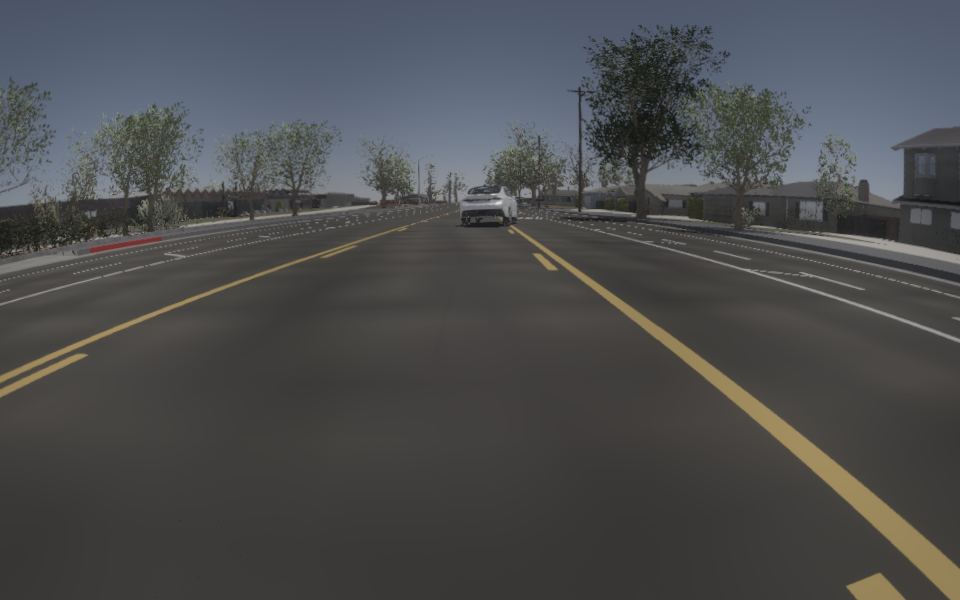
The open CLI checks a lens's shape; the installed runtime plans it, so rig validate and rig show of a rig with a lens need the runtime. Only the Helios Engine draws f-theta lenses.
Lidar (modality: lidar)#
| Attribute | Type | Range | What |
|---|---|---|---|
channels | integer | 1 to 256 | Laser rings, spread evenly over the vertical field |
rangeM | number, metres | above 0, up to 1000 | Maximum range |
pointsPerSecond | integer | above 0 | Points across all channels per second |
rotationFrequencyHz | number, Hz | above 0, up to 240 | Revolutions per second; sets how dense a scan is. A full scan is written at every rendered frame |
upperFovDeg | number, degrees | -180 to 180, above lowerFovDeg | Highest ring's elevation |
lowerFovDeg | number, degrees | -180 to 180 | Lowest ring's elevation. The renderer needs upperFovDeg = -lowerFovDeg (native_lidar_asymmetric_fov_unsupported) |
horizontalFovDeg | number, degrees | 5 to 360, default 360 | Azimuth coverage, centred on the sensor's forward direction |
Each ring takes pointsPerSecond / (channels x rotationFrequencyHz) samples per revolution, rounded and kept between 64 and 4096. A beam that hits nothing within rangeM returns no point.
Radar (modality: radar)#
| Attribute | Type | Range | What |
|---|---|---|---|
horizontalFovDeg | number, degrees | above 0, up to 180 | Horizontal field, centred on the sensor's forward direction |
verticalFovDeg | number, degrees | above 0, up to 180 | Vertical field |
rangeM | number, metres | above 0, up to 1000 | Maximum range |
pointsPerSecond | integer | above 0 | Rays cast per second; at the rig's video.fps this must give at least one ray per frame (native_radar_budget_invalid) |
A rig with a radar needs video (its fps is the radar's sample rate). Each frame lists the detections with their range, angles and radial velocity.
What the renderer adds on top#
rig validate checks the format. A render also checks what the Helios Engine can draw, and fails with a named error before any work:
| Rule | Error |
|---|---|
At least one rgb camera | native_render_camera_missing |
| Cameras at most 4096x4096 | native_camera_size_unsupported |
Only rgb cameras, lidar and radar sources | native_modality_unsupported |
A symmetric lidar field (upperFovDeg = -lowerFovDeg) | native_lidar_asymmetric_fov_unsupported |
A rig with a radar names video | render_schedule_invalid |
| Enough radar rays per frame | native_radar_budget_invalid |
video is mp4, h264, not lossless | native_video_profile_unsupported, native_video_quality_unsupported |